TQE Lockpick — Modern Lockpicking Minigame for RPG Maker MZ
A downloadable plugin
Features
- Two mechanics, switchable per lock. Choose the rotating pick or the marker bar on a per-command basis — mix and match across your game.
- Zero assets required. No spritesheets, no sound files. The UI is rendered procedurally and uses RPG Maker's built-in system sounds.
- One-command setup. A single Start Lockpicking plugin command handles the whole minigame and reports the result.
- "It just works" chest/door mode. Flip the event's own self switch on success — no global switch bookkeeping needed.
- Five difficulty tiers. Novice, Apprentice, Adept, Expert, Master — tune the sweet-spot size, marker speed, zone width, required hits, and pick count.
- Fully configurable failure. Consumable lockpick items, retries, HP damage per break (flat or %), a fail common event, and screen shake — all optional toggles.
- Every input supported. Keyboard, gamepad, mouse, and touch, out of the box.
- Modern dark aesthetic. Glow, easing, progress rings, and feedback flashes in a clean AAA-style panel. Accent colors are yours to change.
The two mechanics
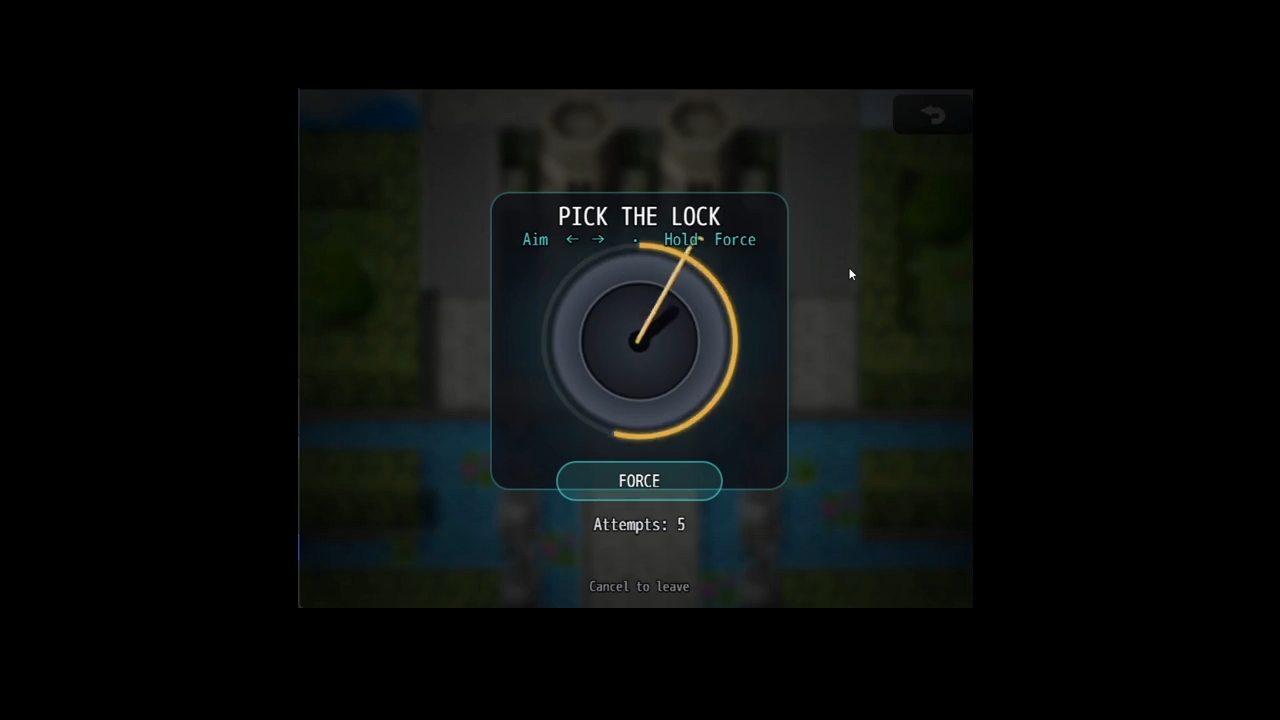
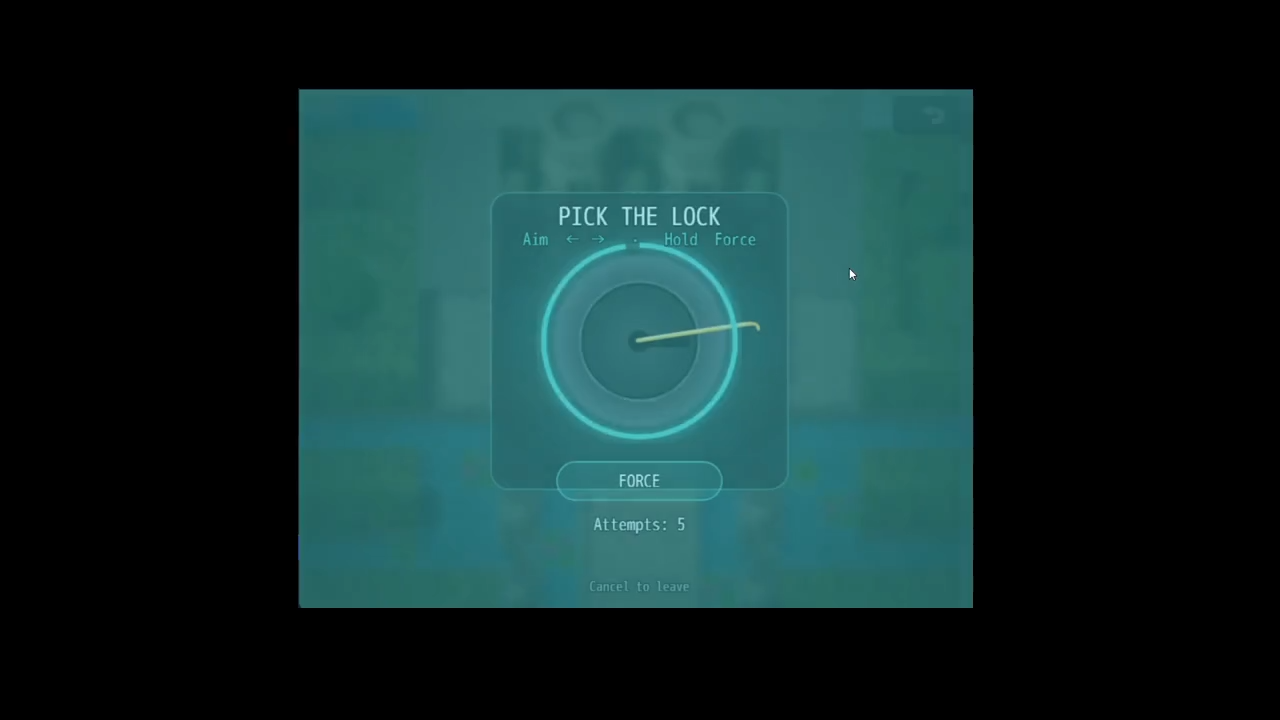
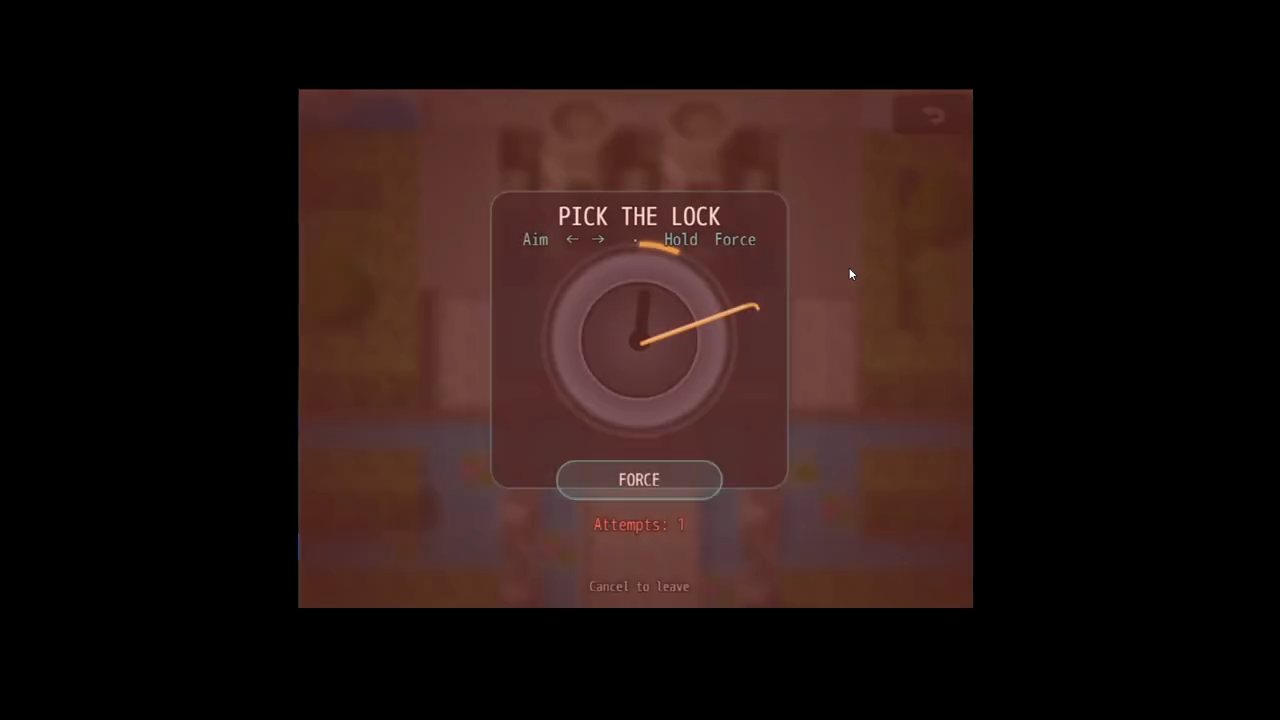
Rotating Pick (Skyrim-style). Aim the pick with the arrow keys, gamepad, or mouse, then hold to apply tension. Near the hidden sweet spot the cylinder turns all the way and the lock opens. Off-angle, it strains, shudders, and the pick snaps. Skill and feel, not luck.
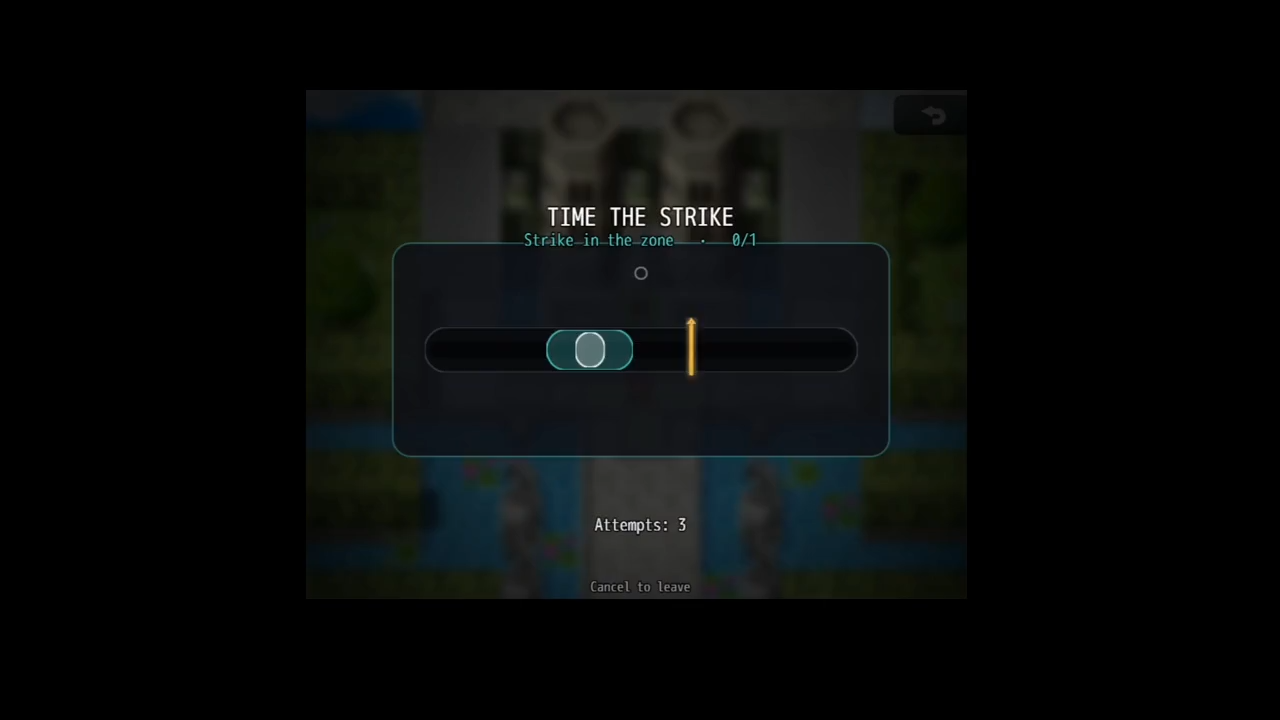
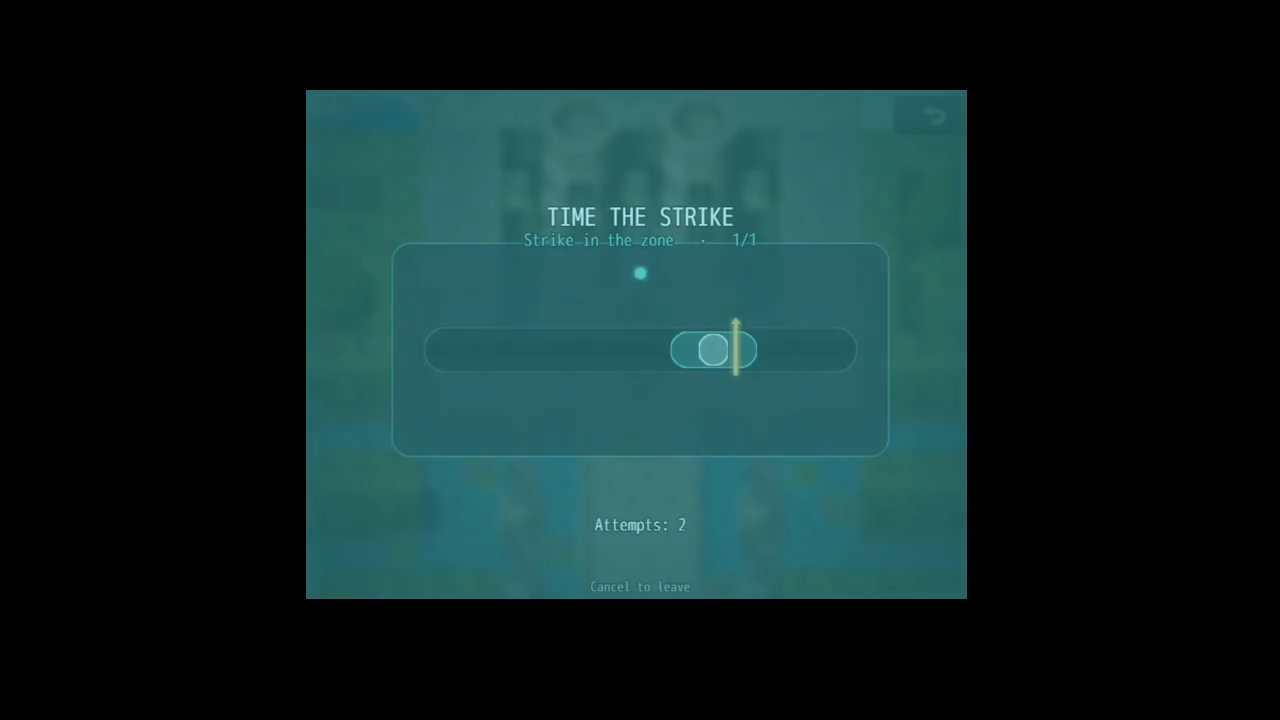
Marker Bar (Timed QTE). A marker sweeps back and forth across a track. Stop it inside the glowing zone — nail the bright core for a PERFECT. Harder locks demand multiple hits in a row and speed up as you go.
Quick setup
The easiest possible lock (a chest or door, no global switches):
- On the event's Page 1, add:
Plugin Command → TQE_Lockpick → Start Lockpicking- Mechanic: Rotating Pick (or Marker Bar)
- Difficulty: Apprentice
- Self Switch On Success:
A
- Add a Page 2 with the condition Self Switch A is ON and put the opened-chest graphic and rewards there.
Done. Success flips Self Switch A and shows Page 2. Failure does nothing, so the player can simply try again (unless you add a penalty).
Branching on a Game Switch instead:
Set the command's Result Switch to, say, #20, then:
◆Plugin Command: Start Lockpicking ◆If: Switch #20 is ON (success — open the door, give loot) ◆Else (failure — "The lock holds fast.") ◆End
The switch is set ON for success / OFF for failure before the event resumes. An optional Result Variable is set to 1 or 0 if you prefer variables.
Controls
Rotating Pick
- Aim: Left / Right arrows, gamepad d-pad, or drag the mouse
- Force: hold OK (Z / Enter / Space / gamepad A) or hold the on-screen FORCE button
Marker Bar
- Strike: OK (Z / Enter / Space / gamepad A), or click / tap anywhere
Cancel (X / Esc / right-click / the corner button) backs out at any time and counts as a failure with no penalty.
Difficulty tiers
| Tier | Sweet spot | Marker speed | Zone width | Hits | Picks |
|---|---|---|---|---|---|
| Novice | Widest | Slow | Wide | 1 | 6 |
| Apprentice | Wide | Steady | Medium | 1 | 5 |
| Adept | Medium | Brisk | Narrow | 2 | 4 |
| Expert | Tight | Fast | Tight | 2 | 3 |
| Master | Tiny | Very fast | Tiny | 3 | 3 |
Every number is editable in a small, commented DIFFICULTY block near the top of the plugin file if you want your own curve.
Configuration highlights
Set once in the Plugin Manager and applies everywhere:
- Appearance: accent color, pick color, danger color, background dim.
- Lockpick items: require a consumable item and consume one per break; running out ends the attempt.
- Failure behavior: allow retry after a break, HP damage per break (flat or % of Max HP), a reserved common event on total failure, and screen shake.
- Sound effects: swap the strike / good-hit / break / success / fail sounds for any in your project.
Compatibility
- RPG Maker MZ. (Not MV — it uses MZ's plugin command and core script structure.)
- Adds its own scene and a single, benign override so event commands wait for the minigame to finish. Designed to sit peacefully alongside other plugins; if you use a large plugin suite, place this one below the core/engine plugins.
Terms of use
Free for both commercial and non-commercial projects. Credit is appreciated but not required. Do not resell or redistribute the plugin file on its own.
Changelog
v1.0.0
- Initial release: Rotating Pick + Marker Bar mechanics, five difficulty tiers, self-switch / switch / variable results, configurable failure and item economy, full keyboard / gamepad / mouse / touch support, zero required assets.
FAQ
Which engine does this support? RPG Maker MZ only. MV uses a different plugin command format and core scripts, so it won't run there.
Do I need to import any images or sound files? No. The entire interface is drawn in code and it uses the system sounds that already ship with MZ. Install the .js and you're done.
How do I make a locked chest or door? Put the Start Lockpicking command on the event's first page and set Self Switch On Success to A. Add a second page conditioned on Self Switch A. Success flips it automatically.
Can different locks use different mechanics or difficulties? Yes — mechanic and difficulty are chosen on each individual plugin command, so every lock can be different.
What happens when the player fails? By default nothing but the sound, so they can walk up and try again. You can optionally make breaks consume lockpick items, deal HP damage, run a common event, and/or shake the screen.
Can I require the player to carry lockpick items? Yes. Turn on Use Lockpick Items, pick the item, and each break consumes one. If the player has none, the attempt fails immediately.
Can the player back out of a lock? Yes — cancel at any time. Backing out counts as a failure but never triggers a penalty.
How do I branch my event on success or failure? Set a Result Switch on the command (ON = success, OFF = fail) and use a Conditional Branch, or read the optional Result Variable (1 = success, 0 = fail).
Can I gate a lock behind the player's lockpicking skill or level? Yes. Store the skill in a variable and use Conditional Branches to call the Start Lockpicking command with an easier or harder difficulty depending on the value — for example, Novice below 5, Adept from 5–9, Master at 10+.
How do I change the look or the difficulty numbers? Colors and background dimming are Plugin Manager parameters. The per-tier difficulty values live in a short, commented DIFFICULTY block at the top of the file — edit them directly for a custom curve.
Does it work with a controller and on mobile/touch? Yes. Keyboard, gamepad, mouse, and touch are all supported automatically, including an on-screen FORCE button for the rotating pick on touch devices.
Will it conflict with my other plugins? It's built to be self-contained and only makes one small, safe change so events wait for the minigame to end. Keep the file named TQE_Lockpick.js and place it below your core/engine plugins.
My event doesn't wait, or the result switch never sets — what's wrong? Almost always a filename issue: RPG Maker loads a plugin's settings by its filename, so the file must stay named exactly TQE_Lockpick.js.
Download
Click download now to get access to the following files:
Leave a comment
Log in with itch.io to leave a comment.